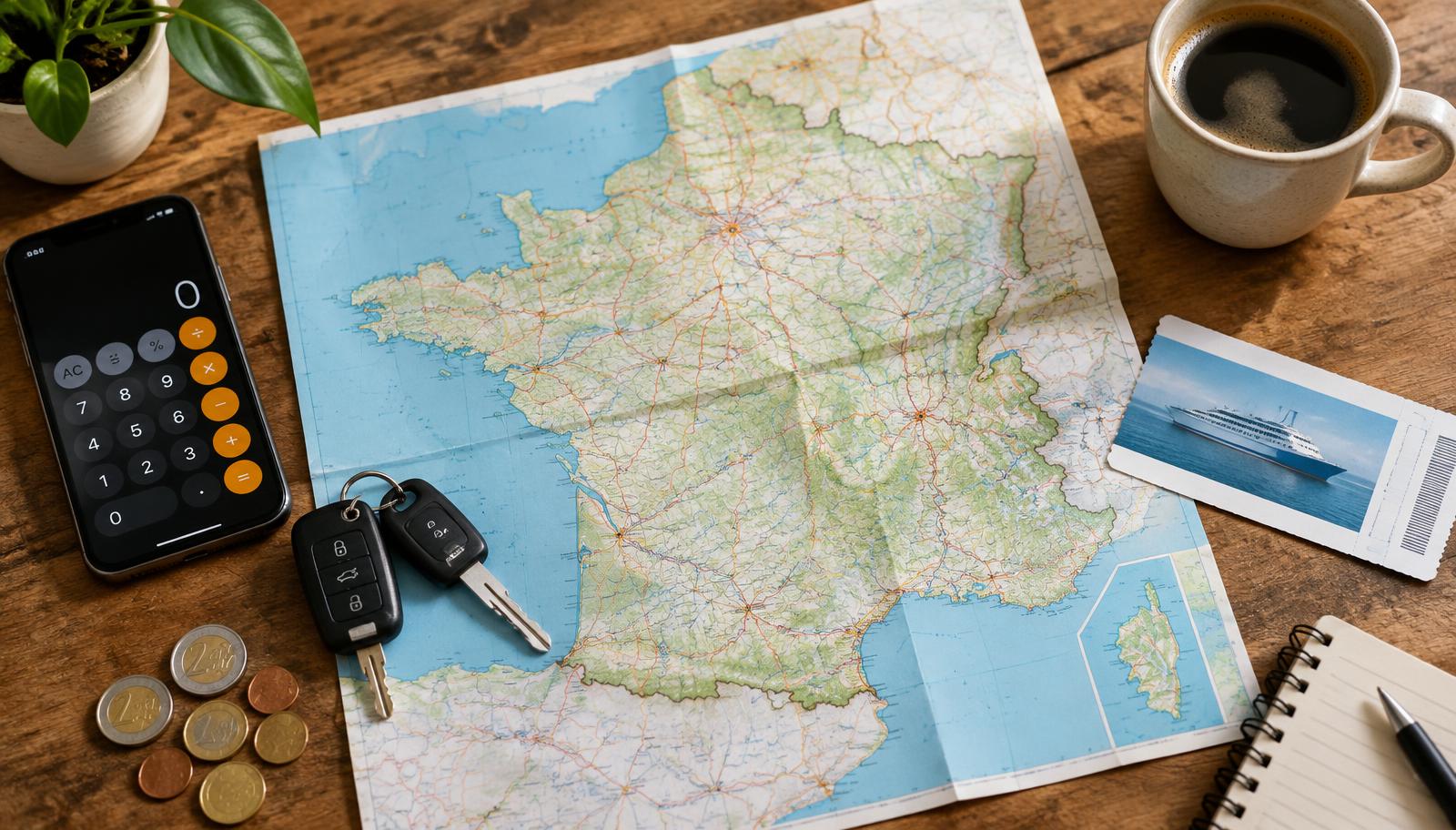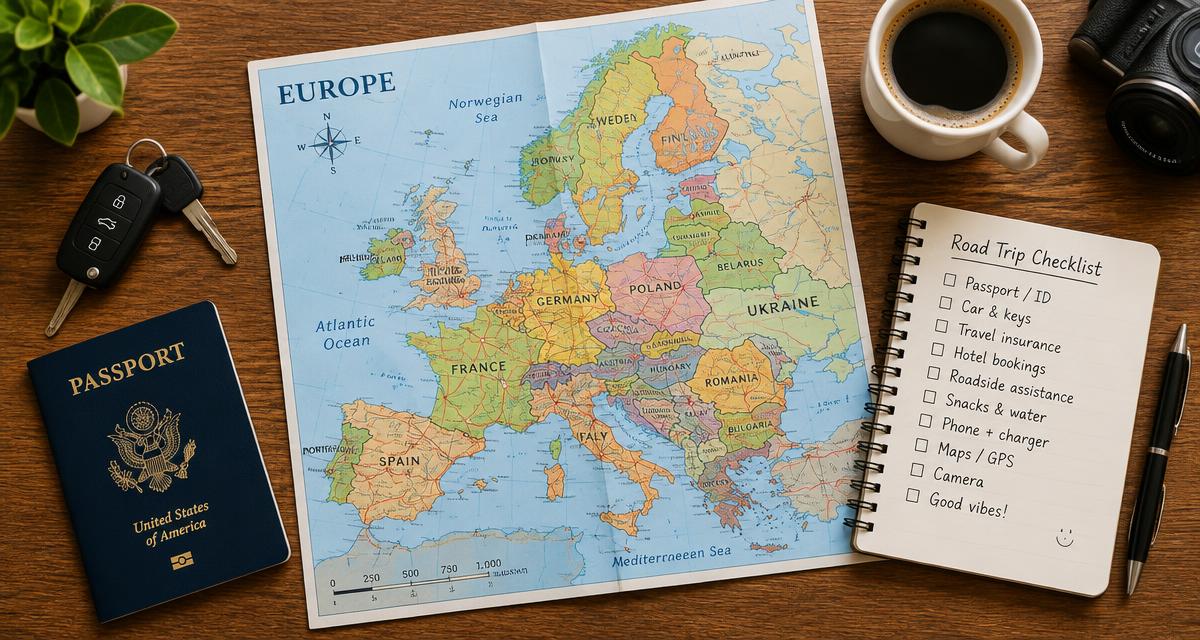
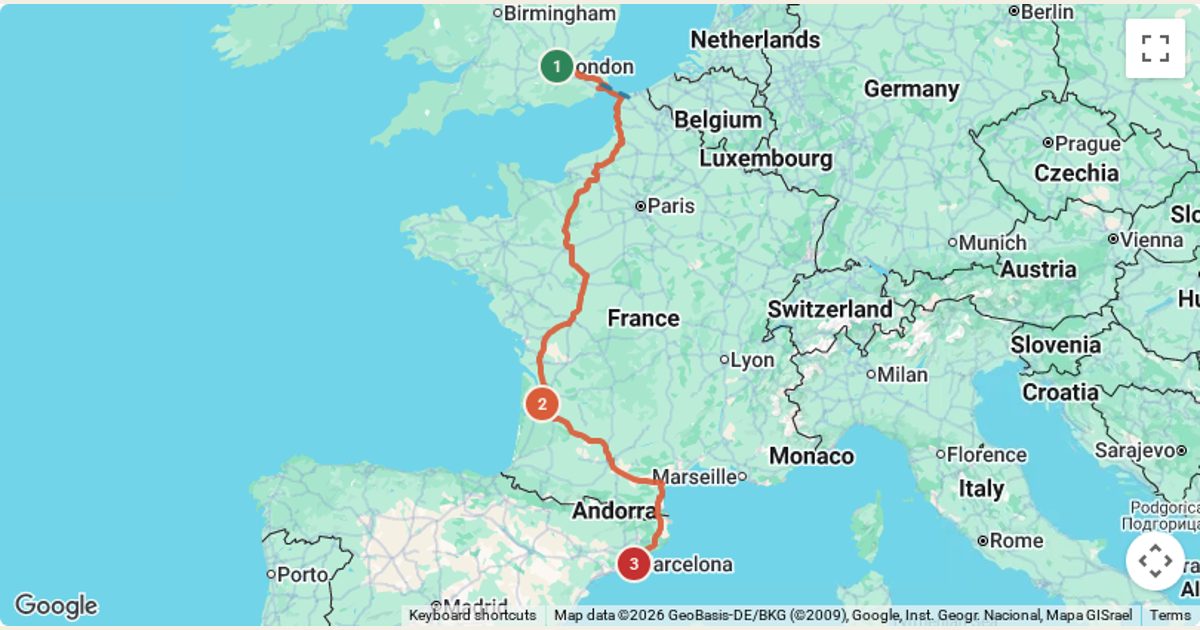
In short: A2B Trip Planner is a free online road trip planner. You enter where you're starting, where you're going and any stops in between. It then shows the route on a Google map and estimates what the whole trip will cost: fuel, ferry or car train, tolls, hotels, food and extras. This guide walks you through every step using a real example, London to Barcelona via Bordeaux.
Open the A2B Trip Planner in another tab and follow along. It takes about five minutes to build your first trip.
What is A2B Trip Planner?
A2B is a road trip planner and cost calculator built for drivers who want to know what a trip will really cost before they set off. It started with UK drivers heading into Europe, so it understands Channel ferries, the Eurotunnel car train and fuel prices that change from country to country. You can also switch region, for example to the USA, where it uses dollars, gallons and US MPG.
Ordinary sat-nav apps get you from A to B. A2B is for the bigger picture: how many days of driving, where to stop overnight, and what the whole trip adds up to. That matters on a multi-day road trip, where ferries, tolls and hotels often cost more than the fuel.
What's free, and the honest limitations
- The planner, the cost calculator, route suggestions, travel inspiration, the trip summary and PDF download are free. You don't need an account to use them.
- Saving trips to a "My trips" list needs a free account (email sign-in).
- All costs are estimates. Fuel prices are typical recent averages, ferry fares are published starting fares or the price you type in, and tolls are often a per-mile estimate. Always check live prices before you book.
- UK number-plate lookup is shown as "coming soon". For now, search your car by name or type your MPG.
- A2B doesn't book anything. Booking links to ferry, hotel and car-hire sites may earn us a small commission at no extra cost to you.
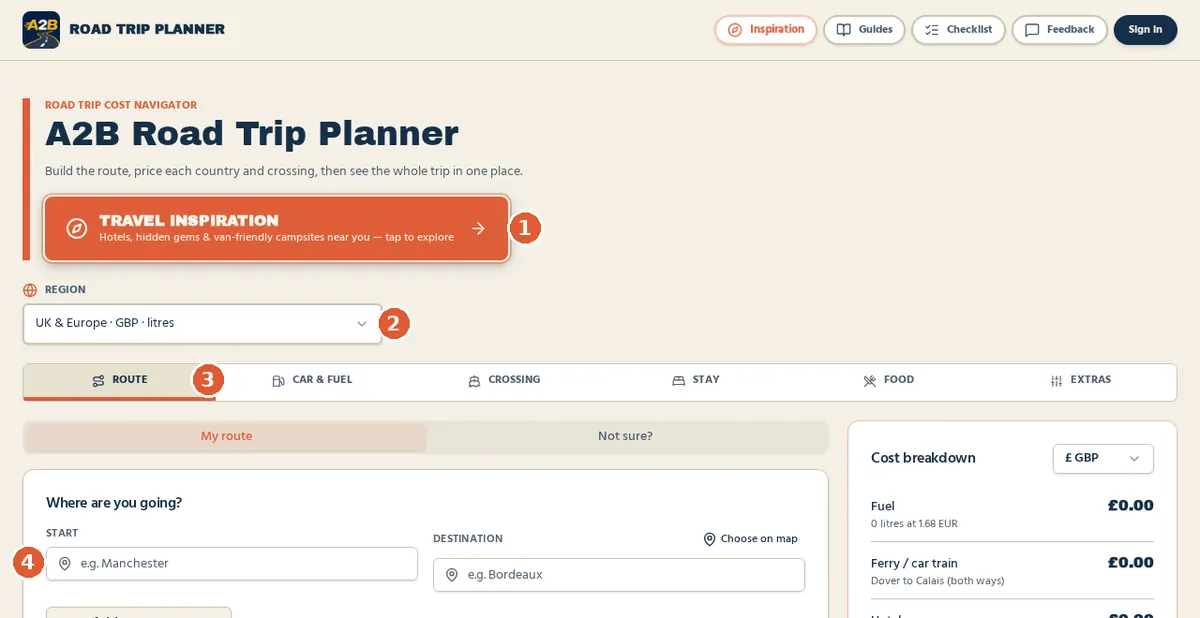
Step 1: Start planning your road trip
Go to the A2B home page. The planner is the first thing you see, so there's nothing to install.
- Choose your region. "UK & Europe · GBP · litres" is the default. The region sets the currency, fuel units and which crossings are offered.
- Type your start. Start typing a town, city or address and pick the right match from the list. In our example that's London, UK.
- Type your destination. Pick Barcelona, Spain from the suggestions. Not sure of the name? Tap "Choose on map" and drop a pin instead.
Along the top you'll see six tabs: Route, Car & fuel, Crossing, Stay, Food and Extras. Work through them left to right. A small tick appears on each tab once you've filled it in, so you can see what's left.
Step 2: Add stops and build your itinerary
Most road trips aren't one long drive. To plan a road trip with multiple stops, press Add a stop en route under your start and destination. A new "Stop" box appears. Search for a place, or choose it on the map.
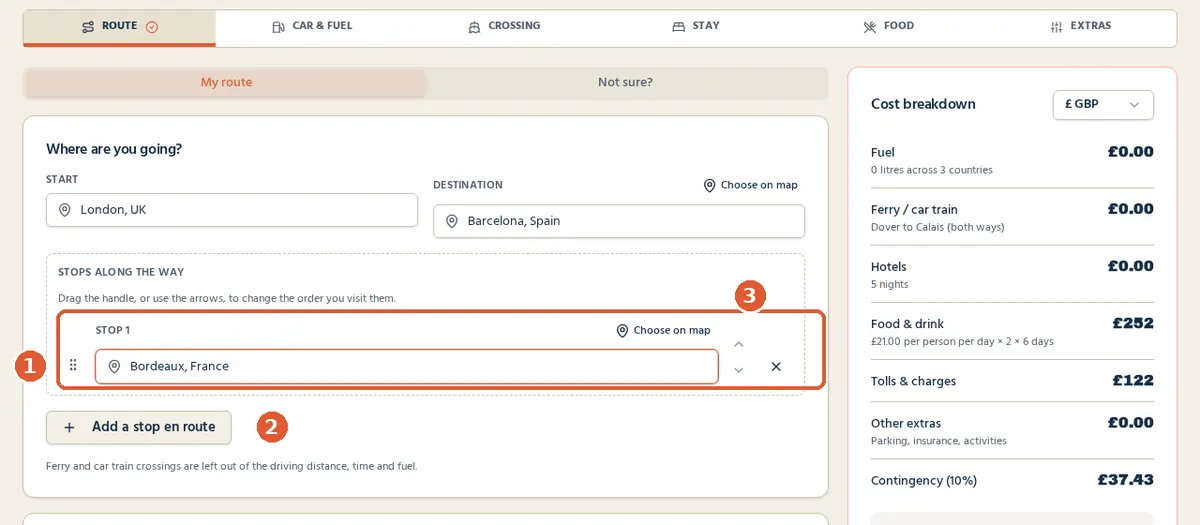
Add as many stops as you like. To change the order, drag a stop by its handle or use the small arrows beside it. The list and the map both update. Remove a stop with the cross.
Planning a multi-day road trip
Under each total, A2B tells you how many hours of driving there are each way and how many overnight stops that means at about 7 hours a day. Our London to Barcelona example came out at 1,022 miles and roughly 15 hours of driving, which A2B flagged as two overnight stops each way. That's a useful sense check before you decide where to sleep.
Ferry and car-train crossings are left out of the driving distance, time and fuel. The crossing time is shown separately.
Calculate your road trip fuel and travel costs
A2B is a free multi-stop road trip planner: add your stops and car to see fuel, tolls, crossings, hotels and food in one estimate. No account needed.
Plan my road trip for freeStep 3: Choose and review your route
As soon as you have a start and destination, the route is drawn under "Your planned drive". Green marks the start, red the destination and the numbered amber pins are your stops. The total miles, driving time and cost per mile appear in the cost panel.
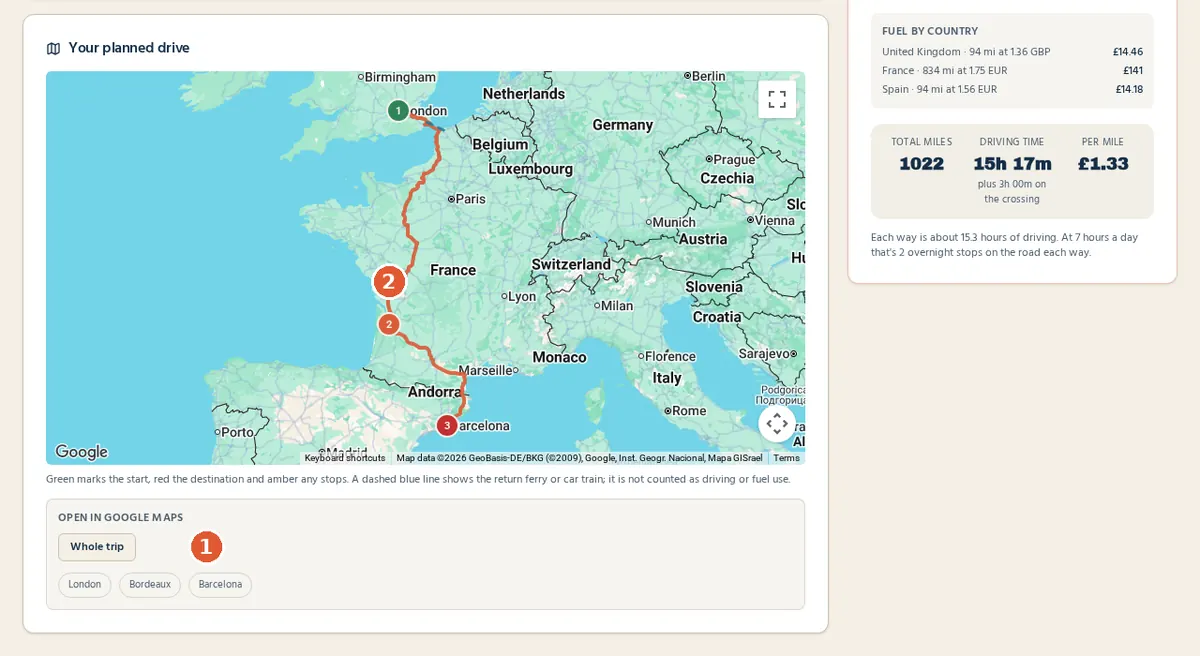
Look at the map and ask: does the line go where I expect? If it takes you somewhere you'd rather avoid, add a stop in a town on the road you want. That pulls the route that way.
Not sure where to stop? Get four route suggestions
On the Route tab, switch from My route to Not sure?. Set how many stops you want, your total trip length in days and how many hours you're happy to drive each day. You can add what you're after, such as "coast, mountains, good food". Then press Suggest me four routes.
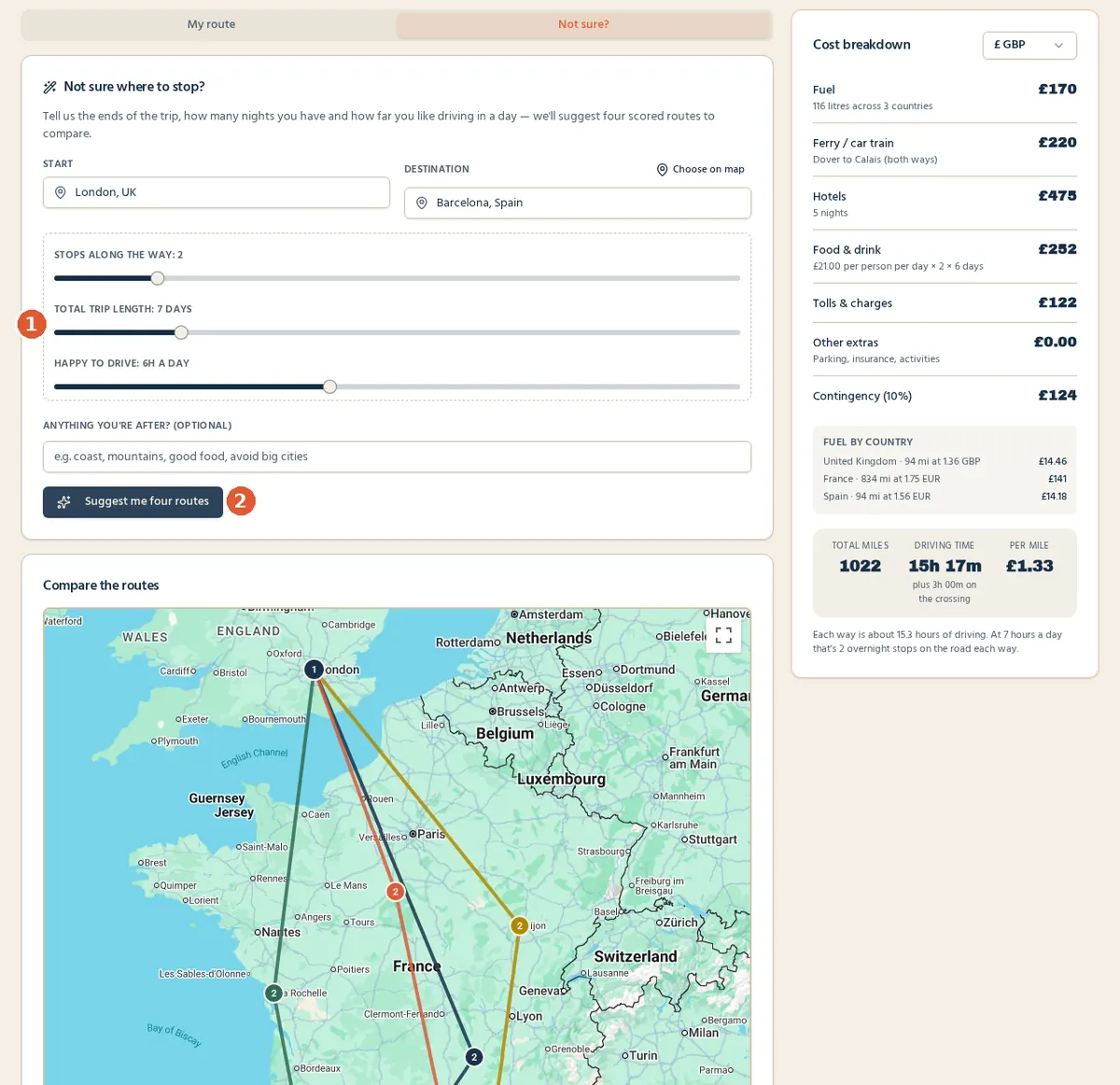
A2B suggests four different styles of route, such as fastest, scenic, a driver's route and a balanced one. Each gets a score, and you can compare them on one map. Pick the one you like and it becomes your route. These suggestions are AI-generated starting points, so check the stops suit you.
Driving a campervan, motorhome or towing? On the Car & fuel tab, turn on "Campervan, motorhome or towing" and enter your height, width, length and weight. A2B then looks for a route that avoids low bridges, narrow roads and weight limits where map data allows. Always follow road signs.
Step 4: Calculate your road trip costs
This is where A2B differs from a normal route planner. The road trip fuel cost calculator needs three things: distance (from your route), your car's fuel economy and the fuel price.
Set your car
Open the Car & fuel tab. Pick your car from the built-in list, or type it into Search any vehicle and press Find MPG. If there are several versions, A2B lists them with year range, engine, fuel type and MPG, so you can choose the exact one.
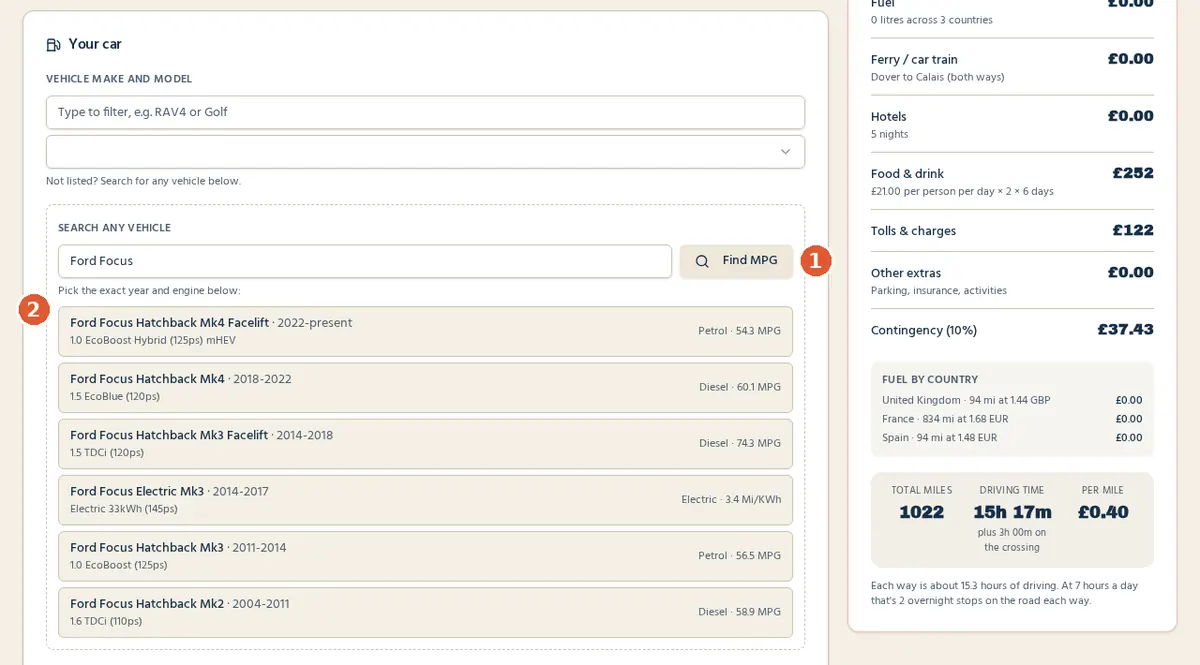
Check the fuel type (petrol, diesel or electric) and the MPG. The real-world adjustment slider lowers the official figure to allow for motorway speeds and a loaded car. It starts at -10%. A2B shows the working figure it actually uses.
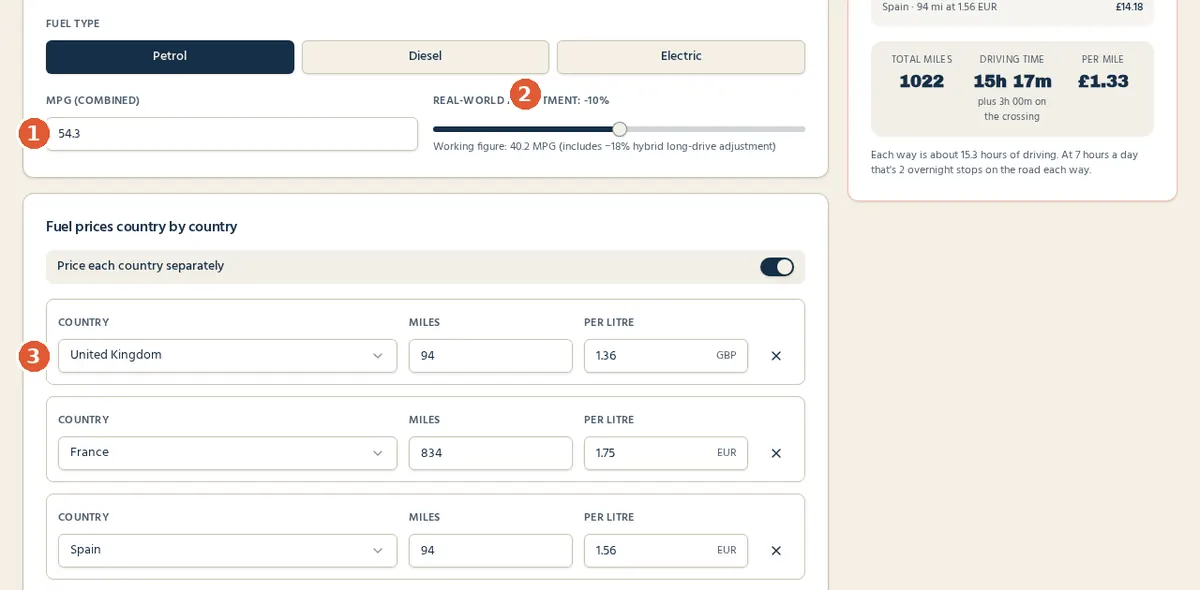
Under Fuel prices country by country, A2B splits your miles by country and applies a typical price per litre in each one. In our example that was 94 miles in the UK, 834 in France and 94 in Spain. You can type your own prices if you know them.
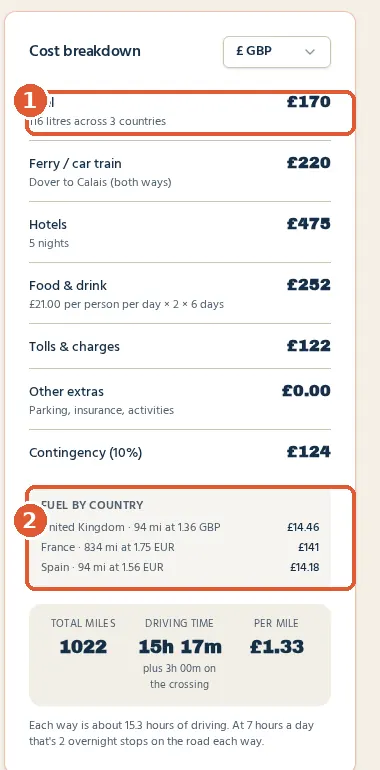
Hotels, food and extras
- Stay: choose total nights, nights per place, or let A2B work it out. Then enter a hotel budget per night and the number of rooms. Our example used 5 nights at £95.
- Food: set a daily food budget per person.
- Extras: tolls, vignettes (road-tax stickers), city and emission charges, the number of people sharing the cost, other extras such as parking, an optional hire-car cost, a contingency percentage and the exchange rate.
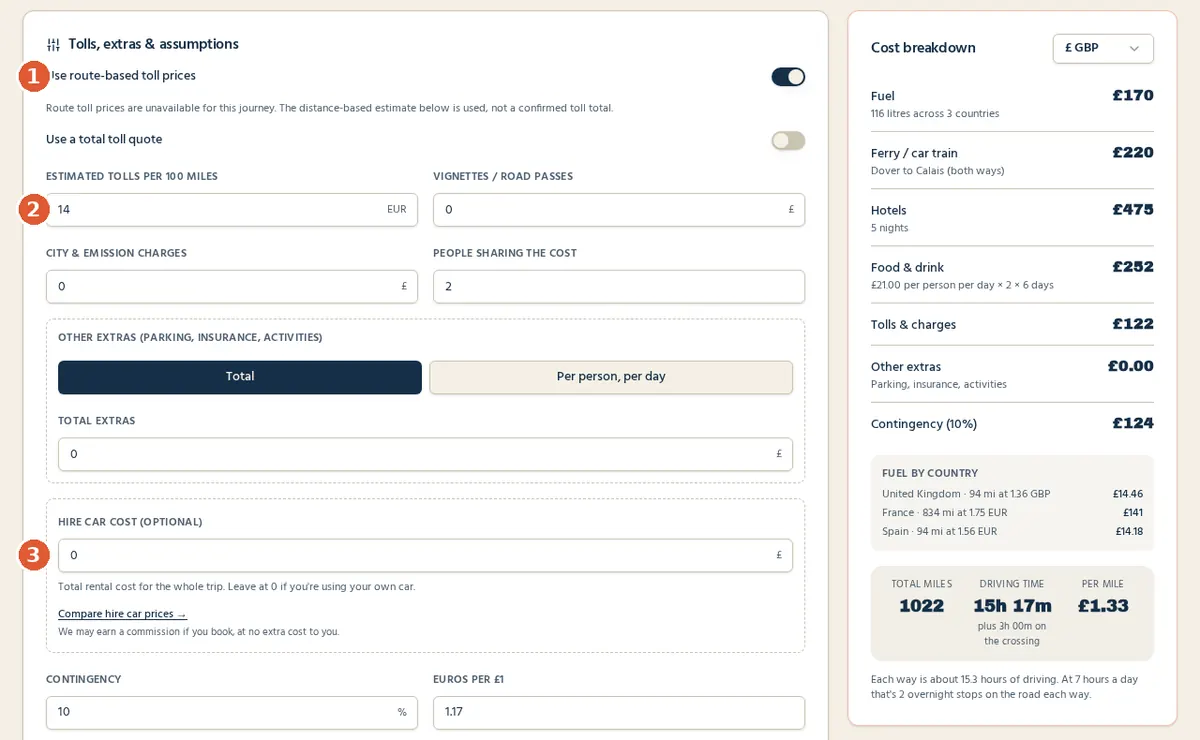
Estimates, not guarantees. When Google has toll prices for your route, A2B uses them. Often it doesn't for European routes, and the app clearly says it's using a distance-based estimate instead. If you have an exact toll figure, switch on "Use a total toll quote" and type it in. Our road trip cost calculator guide explains each cost in more detail.
Ready to see your own numbers? Estimate your fuel costs in A2B now.
Step 5: Plan ferry crossings and other transport connections
In the UK & Europe region, the Crossing tab lists ferry and car-train routes in alphabetical order, from Dover to Calais and Eurotunnel Le Shuttle to longer crossings to Spain and the Netherlands. There's also a custom option and a "No ferry or car train needed" switch.
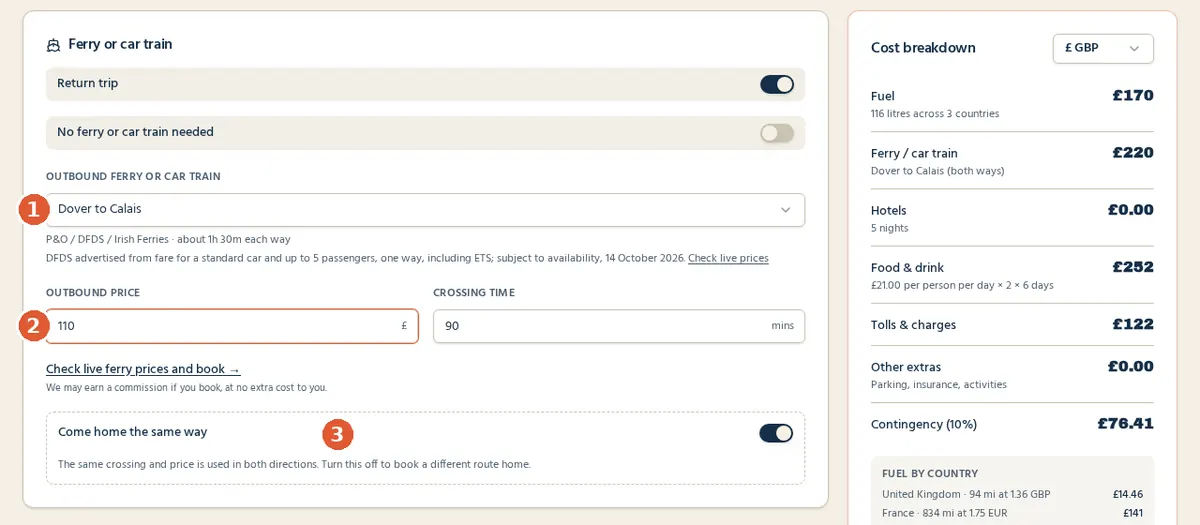
- What A2B works out: the crossing time, a ferry line on the map, and the crossing cost in your total. The sea section isn't counted as driving or fuel.
- What you check yourself: the actual fare for your dates and vehicle. Where we've checked a published starting fare, A2B shows the source and date. Treat it as a guide and use "Check live prices".
- Coming home a different way? Turn off "Come home the same way" to choose a separate return crossing and price.
Our European road trip ferry guide compares the main crossings if you're not sure which to pick.
Step 6: Find places to stay, eat and visit
Tap Inspiration in the header, or the orange Travel inspiration button on the planner. Choose a location, either by typing it or with "Choose on map". Pick Drive or Walk and set a travel-time radius with the slider. Then choose what you want to see: hotels, destinations, campsites (van and motorhome friendly), activities or restaurants. Press Inspire me.
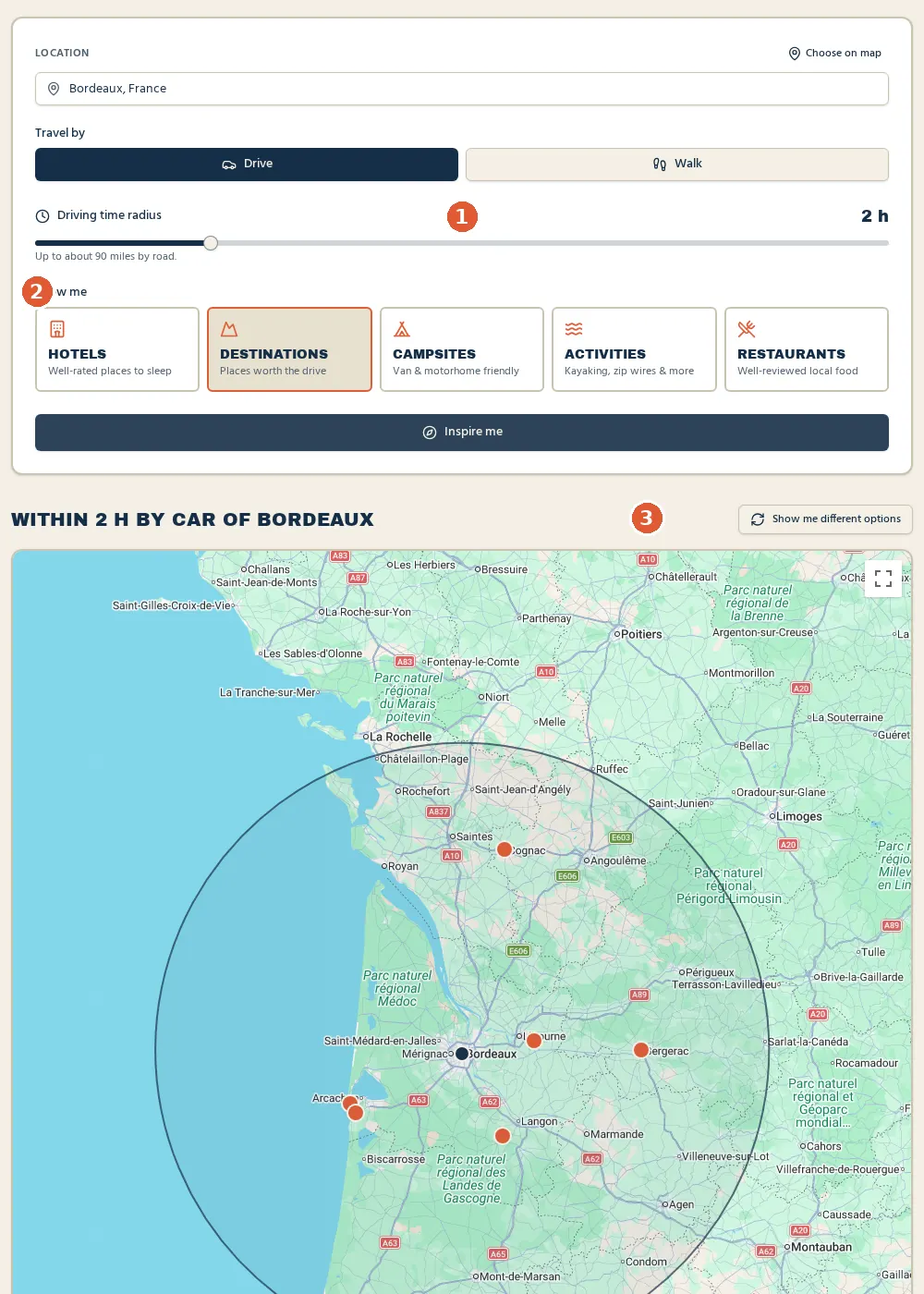
In our test, a two-hour drive from Bordeaux suggested places like Saint-Émilion, Château de Roquetaillade and the Cap Ferret peninsula, each with travel time, a short description and a rough price. Suggestions are AI-generated, so check opening times and prices on the place's own website. Inspiration searches around one point at a time. It doesn't yet search along the whole route, so try it for each stop.
On the Stay tab you'll also find a link to search hotels in your destination on Booking.com.
Step 7: Export and use your route in Google Maps
Below the map is an Open in Google Maps panel. Press Whole trip to open the route in Google Maps, with your stops in order. On a phone, this usually opens the Google Maps app, ready to start navigation. The smaller buttons with place names open each stop on its own.
- Google Maps works out its own roads, so they may differ slightly from A2B's line.
- Google limits how many stops one link can carry. Very long trips with lots of stops are split into a few sections, each with its own button.
- For campervans and motorhomes, a "Size-safe route (one trip)" button pins the size-checked route with a few unnamed points along it, because Google Maps doesn't know your vehicle's size.
Step 8: Make the most of your itinerary
When everything is filled in, press Summary at the bottom of the screen. You'll see your route, each driving leg with miles and time, your nights and the full cost breakdown. From there you can Download PDF or Share the trip with the people you're travelling with.
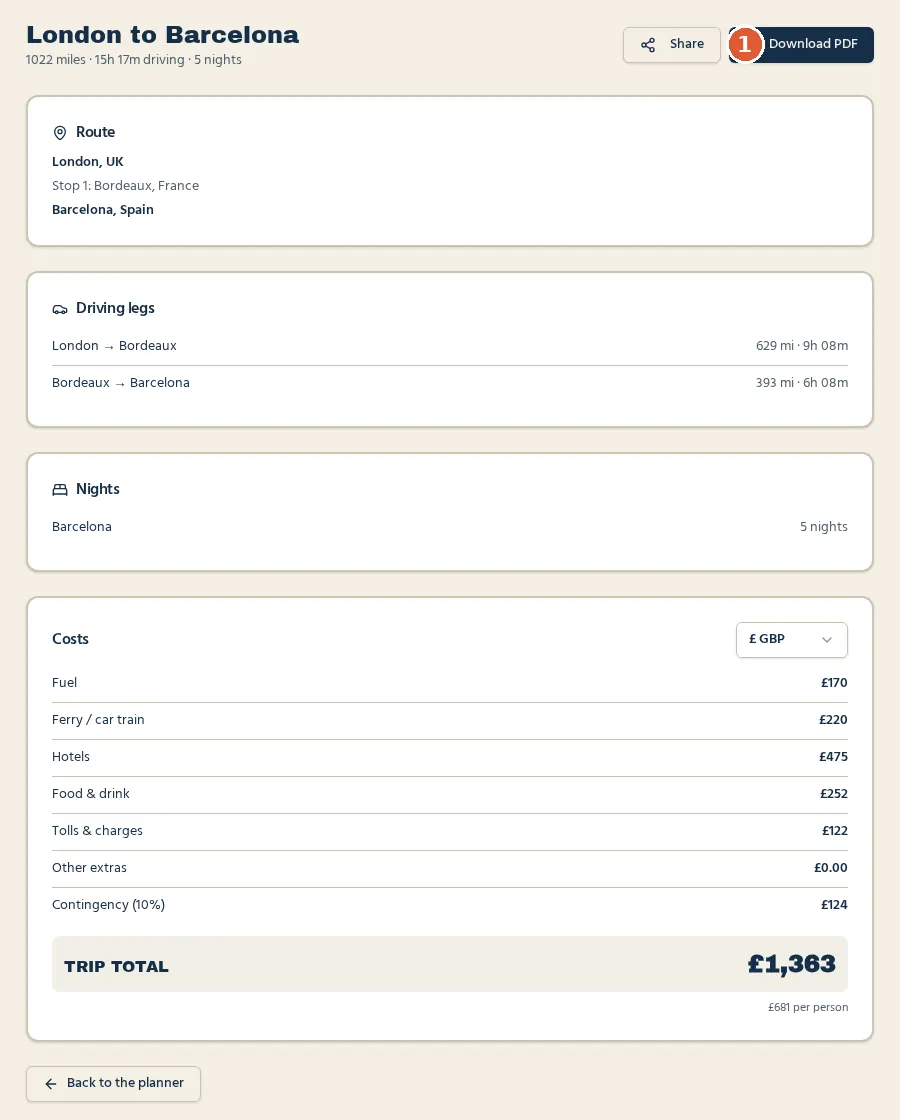
Our example, a petrol Ford Focus with two people, five nights at £95 and a Dover–Calais return at an assumed £110 each way, came to about £1,363, or £681 per person. Those inputs are for illustration only. Use your own quotes.
Practical tips
- Keep driving days realistic. Six to seven hours a day is plenty with breaks, children or mountain roads. Use the overnight-stop hint as a guide.
- Budget fuel with headroom. Keep the real-world adjustment on and the 10% contingency in place.
- Check tolls separately for France, Spain, Italy and Portugal, and buy vignettes for Switzerland and Austria before you cross the border.
- Book ferries early for school holidays. Fares rise as sailings fill.
- Save your trip. Press "Sign in to save" to keep it in My trips, where you can reload, rename or delete it later. Your work-in-progress is also kept on your device if you leave the page.
- Work through our road trip checklist for documents, insurance and kit.
Calculate your road trip fuel and travel costs
A2B is a free multi-stop road trip planner: add your stops and car to see fuel, tolls, crossings, hotels and food in one estimate. No account needed.
Plan my road trip for freeFrequently asked questions
Is A2B Trip Planner free?
Yes. Planning, cost estimates, route suggestions, travel inspiration, the summary and the PDF are free with no account. A free account is only needed to save trips.
How do I plan a road trip with multiple stops?
Enter your start and destination on the Route tab, then press "Add a stop en route" for each stop. Drag the handles or use the arrows to change the order. The map and totals update straight away.
Can I calculate fuel costs before travelling?
Yes. Set your car and fuel type on the Car & fuel tab. A2B multiplies your route distance by your adjusted MPG and the typical fuel price in each country. It's an estimate, and you can change any price.
Can I plan a road trip across Europe?
Yes. The UK & Europe region covers driving across mainland Europe, with fuel prices by country, ferries and the Channel Tunnel. See our UK to Spain road trip guide and best driving roads in Europe for ideas.
Can I include ferry crossings?
Yes. Choose outbound and return crossings on the Crossing tab and enter your fare. The crossing is shown on the map but left out of driving distance and fuel.
Can I use Google Maps with A2B?
Yes. The map in A2B is a Google map. "Whole trip" opens your route, with stops, in Google Maps for navigation.
Can I find accommodation and restaurants along my route?
Use the Inspiration page to find hotels, restaurants, campsites, activities and destinations within a set drive or walk time of any place, such as each of your stops. It searches around one point at a time rather than along the whole line.
Is A2B suitable for long road trips?
Yes, that's what it's designed for: multi-day trips with several stops, overnight hotels, crossings and costs in more than one currency. For a full planning checklist, read how to plan a European road trip.